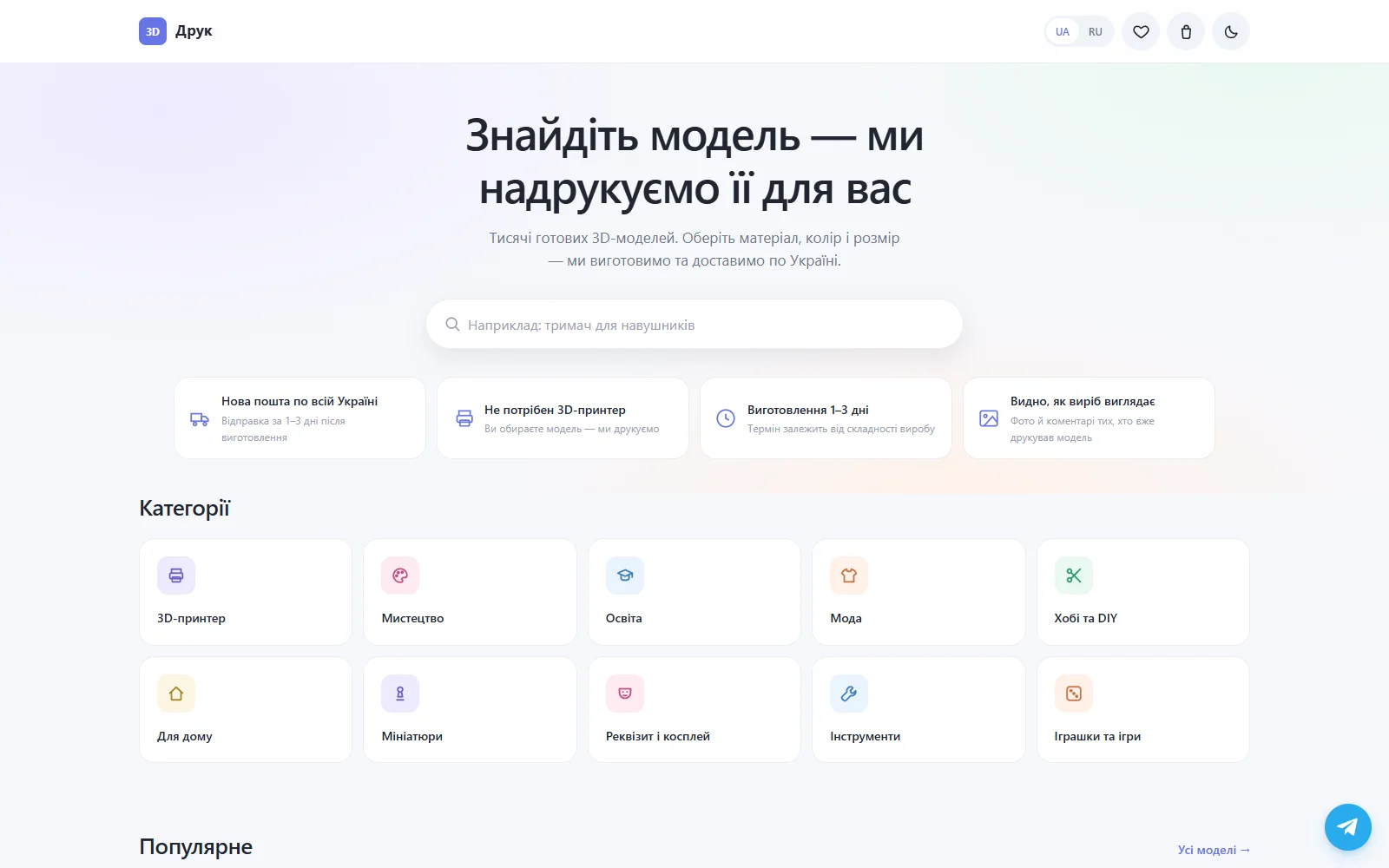
OK3D
LiveA complete platform for choosing 3D models and ordering printed items with manufacturing and delivery.
Full-Stack · Automation · AI Systems · Infrastructure
Websites. Automation. Bots. AI. Infrastructure.
If a process can be programmed, connected to other systems, automated or improved with AI — I design and build the system around it: from interface and backend to the server it runs on.
See what I can automateOne system, every layer — and it runs on its own.
Projects
Websites, services and systems I design, build and launch.
A complete platform for choosing 3D models and ordering printed items with manufacturing and delivery.
What I build
Not a single page or a single script — a working product: interface, backend, data, automation and the server it runs on.
Frontend and backend as one whole — from a landing page to a marketplace with an admin panel.
Everything an employee does by hand on a schedule can be done by a script — faster and without mistakes.
Bots that accept orders, alert on events and give the team an admin panel in the messenger.
Collect, clean, match and keep in sync — thousands of pages, hundreds of thousands of rows.
Local and cloud models integrated into products: assistants, agents, generation, search over your own data.
The server the product runs on: Linux, Docker, reverse proxy, backups and monitoring.
Process
The same path for a landing page and for a system with AI inside. The only difference is how deep each step goes.
Some steps are carried out by AI agents under my supervision. The result is verified in a real browser — with a screenshot, not on faith.
Automation
Almost everything that repeats. Here is how a routine that eats an employee's day turns into a system that runs by itself.
~2–4 hours a day · errors · delays
runs on schedule · 0 manual steps · logs everything
Have a repetitive task? Let's automate it.
Describe the taskHow it's built
Five typical circuits that most of my projects are made of. Each can be ordered on its own or as part of a whole system.
A 'parser' is not a one-page script. It is a pipeline: many sources, normalization, validation, a database — and consumers that need clean data.
When a service has no API, it can still be operated through the browser — like a person would, but on a schedule and with the result verified.
Only where it is technically and legally appropriate. Bypassing security mechanisms is not what this is about.
Not 'just a bot' but an entry point into a system: orders, alerts, admin tools and reports — where the team already is.
I connect systems that were never designed to work together: CRM, store, payments, delivery, analytics, Telegram, internal databases.
The product lives on a server that I set up and maintain myself: from reverse proxy to backups and GPU workloads.
Lab
Small interactive demos. Each one is a simplified version of something I actually build. Everything is simulated in your browser and not connected to live systems.
URL → HTML → structured data → JSON
// JSONSafe demo: parses a prepared page, never an arbitrary site.
One click — the whole chain runs.
$ A clean REST API, the way I build them.
// responseHow an AI layer looks inside a product: question → search over your own data → answer.
Mock interface — answers are scripted, no data leaves the page.
Build → browser → screenshot → analysis → fix. This is how a result gets verified instead of taken on faith.
$ Live analytics — the kind an owner opens each morning.
A typical deploy — simulated, safe.
System
Hover or tap a node to see what I can build there.
Stack
Grouped by layer. Click a group to expand.
Frontend
Backend
Data
Automation
AI
Infrastructure
Dev Tools
AI Lab
Local models on my own GPU server — no per-token bills, no data leaving the network. The same setup can be deployed for your product.
Models
Not 'plugged in a chatbot' but a dedicated layer: a model, retrieval over your data and tools that act inside your system.
Image and video generation and processing on my own GPU — ComfyUI workflows that can be embedded into a pipeline.
Honest labels: 'production' — I use it in real tasks, 'experimental' — works but not production-ready yet, 'research' — still exploring.
Not logos for the sake of logos — what each tool actually does in my systems.
My AI development platform
I am building a local AI-assisted development environment: models, a knowledge base, role-based agents, browser automation and visual verification — on my own infrastructure.
Instead of 'generated the code and assumed the interface is correct' — the environment opens the result in a browser, looks at it and iterates.
A dedicated layer of knowledge about interfaces, so the agent composes pages from proven patterns rather than 'whatever comes out'.
The base is curated references, documentation, open resources and pattern metadata. Not copies of commercial UI libraries.
Code
Realistic fragments — API integration, automation, data processing. No secrets, no hello-worlds.
<?php
declare(strict_types=1);

// Webhook нового заказа: подпись → валидация → БД → уведомление.
// Секреты берутся из окружения, в коде их нет.

$secret  = getenv('ORDER_WEBHOOK_SECRET') ?: '';
$payload = file_get_contents('php://input');
$given   = $_SERVER['HTTP_X_SIGNATURE'] ?? '';

if (!hash_equals(hash_hmac('sha256', $payload, $secret), $given)) {
    http_response_code(401);
    exit;
}

$order = json_decode($payload, true, 8, JSON_THROW_ON_ERROR);

$rules = [
    'id'     => fn($v) => is_int($v) && $v > 0,
    'phone'  => fn($v) => preg_match('/^\+?\d{10,15}$/', (string) $v),
    'items'  => fn($v) => is_array($v) && count($v) > 0,
    'total'  => fn($v) => is_numeric($v) && $v >= 0,
];
foreach ($rules as $field => $ok) {
    if (!isset($order[$field]) || !$ok($order[$field])) {
        http_response_code(422);
        echo json_encode(['error' => "invalid {$field}"]);
        exit;
    }
}

$db = Db::connection();
$db->beginTransaction();
try {
    $db->prepare(
        'INSERT INTO orders (id, phone, total, status, created_at)
         VALUES (:id, :phone, :total, "new", NOW())
         ON DUPLICATE KEY UPDATE total = VALUES(total)'
    )->execute([
        'id' => $order['id'], 'phone' => $order['phone'], 'total' => $order['total'],
    ]);

    $stmt = $db->prepare('INSERT INTO order_items (order_id, sku, qty) VALUES (?, ?, ?)');
    foreach ($order['items'] as $item) {
        $stmt->execute([$order['id'], $item['sku'], (int) $item['qty']]);
    }
    $db->commit();
} catch (Throwable $e) {
    $db->rollBack();
    error_log('order webhook: ' . $e->getMessage());
    http_response_code(500);
    exit;
}

// Уведомление — асинхронно, чтобы не держать вебхук открытым.
Queue::push('telegram.notify', [
    'chat' => 'orders',
    'text' => sprintf("🛒 Заказ #%d — %s ₴\n%d позиций",
        $order['id'], number_format($order['total'], 0, '.', ' '), count($order['items'])),
]);

http_response_code(202);
echo json_encode(['ok' => true]);"""Мониторинг цен: обход по расписанию, история, AI-оценка изменений."""
from __future__ import annotations
import asyncio
import logging
from dataclasses import dataclass
from decimal import Decimal
import httpx
from tenacity import retry, stop_after_attempt, wait_exponential
from monitor.db import PriceRepo
from monitor.llm import classify_change
from monitor.notify import telegram
log = logging.getLogger(__name__)
@dataclass(frozen=True)
class Target:
sku: str
url: str
selector: str
@retry(stop=stop_after_attempt(4), wait=wait_exponential(min=2, max=30))
async def fetch_price(client: httpx.AsyncClient, target: Target) -> Decimal:
resp = await client.get(target.url, timeout=20)
resp.raise_for_status()
node = parse_html(resp.text).select_one(target.selector)
if node is None:
raise LookupError(f"selector miss: {target.sku}")
return normalize_price(node.get_text())
async def check(target: Target, repo: PriceRepo, client: httpx.AsyncClient) -> None:
price = await fetch_price(client, target)
previous = await repo.last(target.sku)
await repo.append(target.sku, price)
if previous is None or previous == price:
return
delta = (price - previous) / previous * 100
verdict = await classify_change(target.sku, previous, price, delta)
if verdict.significant:
await telegram.send(
"pricing",
f"📉 {target.sku}: {previous} → {price} ({delta:+.1f}%)\n{verdict.reason}",
)
async def main() -> None:
repo = PriceRepo.from_env()
targets = await repo.targets()
sem = asyncio.Semaphore(6) # не долбим один сайт параллельно
async with httpx.AsyncClient(headers={"User-Agent": "price-monitor/2.1"}) as client:
async def guarded(t: Target) -> None:
async with sem:
try:
await check(t, repo, client)
except Exception: # одна ошибка не должна ронять весь прогон
log.exception("target failed: %s", t.sku)
await asyncio.gather(*(guarded(t) for t in targets))
if __name__ == "__main__":
asyncio.run(main())// Тонкий API-клиент: дедупликация одинаковых запросов,
// отмена устаревших, оптимистичное обновление кэша.
const inflight = new Map();
export function createClient({ baseUrl, onError }) {
const cache = new Map();
async function request(method, path, { body, signal } = {}) {
const key = method === 'GET' ? `GET ${path}` : null;
if (key && inflight.has(key)) return inflight.get(key);
const run = fetch(baseUrl + path, {
method,
headers: { 'Content-Type': 'application/json' },
body: body ? JSON.stringify(body) : undefined,
signal,
})
.then(async (res) => {
if (!res.ok) throw new ApiError(res.status, await res.text());
return res.status === 204 ? null : res.json();
})
.catch((err) => {
if (err.name !== 'AbortError') onError?.(err);
throw err;
})
.finally(() => key && inflight.delete(key));
if (key) inflight.set(key, run);
return run;
}
return {
get: (path, opts) => request('GET', path, opts),
// Оптимистично: UI видит изменение сразу, откат — только при ошибке.
async patch(path, body, { optimistic } = {}) {
const prev = cache.get(path);
if (optimistic) cache.set(path, { ...prev, ...body });
try {
const data = await request('PATCH', path, { body });
cache.set(path, data);
return data;
} catch (err) {
cache.set(path, prev);
throw err;
}
},
// Поиск с отменой предыдущего запроса при новом вводе.
search: (() => {
let controller;
return (q) => {
controller?.abort();
controller = new AbortController();
return request('GET', `/search?q=${encodeURIComponent(q)}`, {
signal: controller.signal,
});
};
})(),
};
}
export class ApiError extends Error {
constructor(status, body) {
super(`API ${status}`);
this.status = status;
this.body = body;
}
}Experience
10+ years
Each layer was added because the previous one wasn't enough to ship a whole product.
Sites, layouts, CMS, first backends in PHP.
APIs, databases, payments, auth — logic behind the interface.
Parsers, bots, schedulers — removing manual work from processes.
Own servers: Linux, Docker, Nginx, backups, monitoring.
Local models, agents, RAG — AI as a layer inside products.
About
I've been programming for more than 10 years. I work across the full product stack — interface, backend, databases, automation, servers and AI.
I enjoy problems where software can remove repetitive work or turn a complicated process into a simple system.
Don't automate because it's trendy. Automate because humans shouldn't waste time doing what software can do reliably.
Problems I solve
Contact
Tell me what you're trying to automate, build or improve. You don't need to know which stack you need — just describe the task.